
If you like to plan your day/week/month with Week Plan in one hand and yet still have access to your normal calendar software on your mobile, , then our latest integration with Outlook may excite you.
Yes, you can synchronize your Outlook data with Week Plan and vice-versa in real time.
To get started, make sure you get on the ULTIMATE plan or the PRO plan with the “Outlook calendar” feature selected.
Then all you’ll need to do is follow these three steps below.
- Connect Your Outlook Calendar from Team Settings Sign in and visit the Team Settings tab from the top left menu and go to the section “Outlook Calendar”.
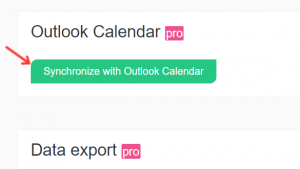
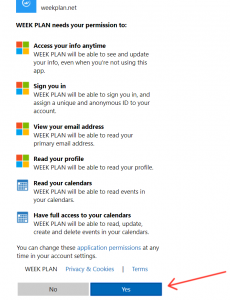
- Authorize Week Plan to access your Outlook data Once, you click on “Synchronize With Outlook Calendar” tab, you will be requested to Sign In and enter your Outlook Credentials and allow WeekPlan to do the synchronization in real time.
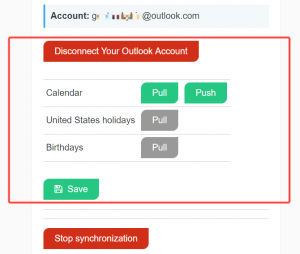
- Select which calendars you want to synchronize You can start the synchronization by selecting “Pull” which will update all the events from Outlook Calendar on WeekPlan. Then select “Push” to send all the tasks from Week Plan to Outlook Calendar. The initial synchronization may take up to 5 minutes. So, please refresh your browser to see the changes.
We’d love to hear what you think about our latest integration, and what you’d like to see next. Drop us a line on Twitter, Facebook, or in the comments below.
More Posts
10 Best Productivity Planners
Are you struggling to power your efficiency? Is it easy for you to start a task but it is a huge chore to keep at it until it’s complete? If you nodded your...
9 Time Management of Tips for Night Owls
If you find yourself feeling most alive in the evening, you're in good company. Studies show our internal clocks set our energy highs and lows. Night owls get their energy spike later, unlike...
11 Ways Social Media Addiction Contributes to Procrastination
In our digital world, social media addiction is a big reason for putting things off. These platforms make us feel connected and give us lots of info. But, they also distract and waste our time....
Best Project Tracking System to Manage Tasks
![7 Project Time Tracking Software Tools for Project Managers]() Project managers, have you ever felt the weight of managing tasks and tracking time for your entire team while trying to keep everything aligned...